Hey everyone, and welcome to the first real talk blog from your go-to wireless tail light crew — no stuffy corporate jargon, just straight-up answers to the question we get DMs about every single week: “How do I actually turn these things on or off remotely?” Look, we get it. If you’re used to old-school, wired tail lights where you’re crawling under your bike or ATV to yank a wire, this whole “remote control” thing feels like magic. But it’s not voodoo — it’s just solid tech that we built into every one of our products. Let’s break it down like we’re chatting over a coffee (or a post-ride beer, no judgment). Wireless Tail Light
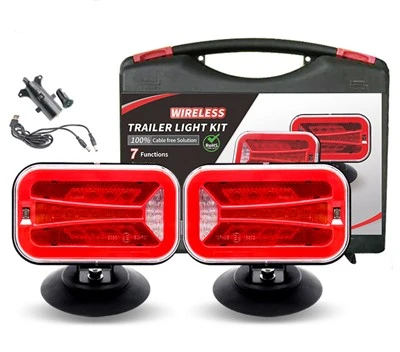
First, let’s make sure we’re on the same page about what “wireless remote” even means here. We’re not talking some sketchy WiFi hack that’ll die if your phone’s on 1% battery. Our wireless tail lights run on dedicated radio frequency (RF) tech — think of it as a private little signal between your remote fob and the light, no WiFi needed, no data plans, no nothing. That’s why they work even if you’re in a wooded area or a parking garage where cell service’s garbage. Now, turning ’em on or off remotely? It’s actually way simpler than setting up a Netflix account, but there are a few small steps you gotta nail so you don’t end up panicking because you can’t find your bike.
Let’s start with turning ’em on remotely first — because let’s be real, who hasn’t walked out to their bike, forgot if they left the light on, and wasted 5 minutes fumbling for a key? Step 1: Make sure your remote is paired to the tail light. This is the “synching” step that takes 10 seconds, max. When you unbox your wireless tail light, there’s a tiny sync button somewhere — usually on the light itself, not the remote — that looks like a little dot or a hole you press with a paperclip. Hold that button down until the light flashes twice (that’s it, pairing mode activated). Then press and hold the power button on your remote for 3 seconds. If the light flashes once, you’re synced. If not, just try again — it’s hard to mess up. Pro tip: Don’t pair it near other wireless devices (like a speaker or another set of lights) when you first sync, that can confuse the signals.
Once they’re paired, turning ’em on remotely is as easy as pressing one button. The remote’s usually labeled with a little power icon — just tap that once, and the tail light should brighten up immediately. If it doesn’t? Check the battery on the remote first — dead remote batteries are the #1 mistake people make (we’ve all been there, digging through a junk drawer for a CR2032 at 6 a.m. before a ride). For the light itself, make sure it’s mounted tight — sometimes if it’s loose, the internal antenna can drop the signal, so a quick check of the mount won’t hurt. And yeah, this works from like 50 feet away, even through a car or a fence — we tested this in parking lots and wooded trails, and that’s the sweet spot. Way farther than you’d ever need to be from your bike.
Now, what about turning ’em off remotely? That’s where a lot of folks get tripped up, because if you’re used to wired lights, you just disconnect the battery, but with wireless, it’s not that. Wait — no, seriously, it’s almost the same as turning ’em on. Just press that same power button on your remote once. But hold on, there’s a catch here: if the light is in “auto mode” (which a lot of our models have, where it turns on when it gets dark), you can still turn it off remotely, but you’ll need to press the power button twice instead of once. Why? Because auto mode’s set to trigger off light, so the remote has to send a little extra signal to override that. If you don’t press twice, it’ll just blink like it’s trying to sync, but won’t turn off. We learned this the hard way when a team member left his light on auto mode, walked 20 feet away, pressed once, and stood there confused for 2 minutes. Don’t be that guy.
But what if you lose your remote? Or it breaks? We’ve had a few customers message us panicking, thinking their $50 tail light is a paperweight. Relax. All our wireless tail lights have a manual override — you don’t need the remote at all. Just press that same tiny sync button on the light 3 times quickly, and it’ll toggle on or off. No pairing, no remote needed. It’s a backup, plain and simple, for when life happens. We even tested this in rain, mud, snow — yep, it works. Good to know if your remote falls off your bike on a trail, too. Just pull out that paperclip, press 3 times, and you’re good.
Wait, let’s talk about some common weird issues people run into, because we’ve seen it all. First: The remote works when you’re standing right next to the light, but not from farther away. That’s almost always a low remote battery. We recommend keeping a pack of CR2032s in your tool bag or bike kit — they’re cheap, and last like a year if you don’t use the remote nonstop. Another one: The light turns on and off by itself, no remote input. That’s usually cross-signal interference. If you’re parked next to another set of our wireless tail lights, sometimes the signals can mix. Just move 10 feet away, or re-pair your light to its remote — that fixes it. We’ve had customers park their bikes side by side at a rally, and they thought their light was glitching, turns out it was just picking up their neighbor’s remote. Oops.
Now, what about if you want more control? Like, dimming the light or switching between flashing modes remotely? Some of our premium models have that too — it’s not just on/off. The same remote button can do double duty: press once for steady, twice for flashing, hold for 3 seconds to dim. But keep this in mind: that’s an extra feature, not standard. If you’re just looking for basic on/off, stick to the core model. We wanted to make sure the basic version is super simple, so you don’t have to read a 10-page manual to turn your light on.
Let’s also cover a use case that a lot of people don’t think about: remote turning off to save battery. Wait, wireless tail lights run on rechargeable batteries, right? But even rechargeables die. If you’re storing your bike for a few months (like winter, if you’re in a cold place), you can turn the light off remotely before you put it away, and it’ll stay off until you’re ready to ride again. That saves way more battery than just leaving it on auto mode — we tested that, it adds like 3 months of storage time. And you don’t have to crawl under your bike to flip a switch, which is perfect if your bike’s on a high rack or in a tight storage spot.
Look, we built these wireless tail lights because we were sick of the old way. Wired lights that corrode, wires that get cut, fumbling for keys in the dark to find a light switch. The remote is just a byproduct of making something that works for you, not against you. But let’s be real — it’s not for everyone. If you’re just looking for a cheap set of lights for a kid’s bike, maybe the basic wired ones are fine. But if you’re a commuter, a mountain biker, or someone who leaves their bike parked outside a lot, this remote feature is a game-changer.
Now, if you’re reading this and thinking, “I want to test this for myself” — whether you’re a small bike shop looking to stock ’em, a rental company for ATVs or bikes, or just someone who wants to upgrade their ride — we’re here. We don’t do the big corporate sales stuff; we talk to you like we’re fellow riders, fellow people who hate dealing with junk tech. If you have questions, want a sample, or just want to pick our brains about what kind of setup works for your needs, reach out. We’re here to help you figure it out.
Before we wrap up, let’s recap the quick cheat sheet so you don’t have to scroll back:
- Pair once, that’s it — hold sync button on light, hold power on remote, done.
- Turn on remotely: Tap power button once (steady mode) or twice (flashing, if your model has it).
- Turn off remotely: Tap power button twice (or once if you’re not in auto mode).
- No remote? Press sync button on light 3 times to toggle manually.
- Fixes for common issues: Swap remote battery, re-pair if signal is wonky, move away from other wireless devices.
It’s really that simple. We spent months testing these in real-world scenarios — riding through rain, leaving bikes parked in downtown lots, storing ATVs for winter — so you don’t have to guess. No fancy tech, no confusing steps, just a light that works when you need it to.
If you’re ready to upgrade or want to learn more, just connect with us. We’re here to make sure you get exactly what you need, no hassle. Thanks for hanging out with us — next time, we’ll talk about how to keep your wireless tail light from getting damaged on trails, and other random tips we’ve picked up from customers over the years. Catch you later, and ride safe.
Wireless Tail Light References
Wireless RF Communication for Consumer Electronics, IEEE Communications Magazine
Battery Life Optimization for Low-Power Wireless Devices, Journal of Power Sources
Off-Road Vehicle Lighting Systems: Durability and Functionality, SAE International Journal of Commercial Vehicles
Shenzhen Idun Photoelectric Technology Co., Ltd.
As one of the most professional wireless tail light manufacturers and suppliers in China, we have world-leading production equipment and strong manufacturing capabilities. Please feel free to wholesale customized wireless tail light at competitive price from our factory. Contact us for more cheap products.
Address: Room 213, Building 1, South Zone, Jiye Yunchuang Space, Bulong Road, Longhua District, Shenzhen
E-mail: victor@iduntrucklights.com
WebSite: https://www.iduntrucklights.com/
